> For the complete documentation index, see [llms.txt](https://wiki.stmod.net/llms.txt). Markdown versions of documentation pages are available by appending `.md` to page URLs; this page is available as [Markdown](https://wiki.stmod.net/private-servers/general-tab.md).
# General Tab
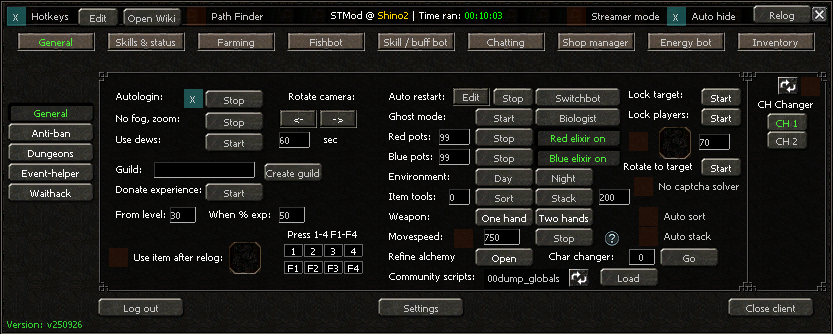
General tab (build v250926)
{% hint style="info" %}
The window chrome around this tab (top bar, tab list, bottom bar) is documented once on the [Main STMod Window](/private-servers/main-stmod-window.md) page.
{% endhint %}
* **Autologin** — See the **Autologin** section on the [Main STMod Window](/private-servers/main-stmod-window.md) page for the full setup.
* **No fog / Zoom** — Removes the in-game fog and increases the camera zoom limit.
* **Use dews** — The bot will automatically use all types of damage-boosting items (such as Piercing Strike and Critical Strike) at the specified delay interval.
* **Rotate camera** — The two arrow buttons rotate the camera left/right. Useful for preventing the black-screen issue some servers cause during long sessions.
* **Guild** — Allows you to create a guild remotely without meeting the required level. Note: this may not work on all private servers.
* **Donate experience** — The bot will automatically donate your experience to the guild once you reach **From level** and **When % exp** is at or above the value you set.
* **Use item after relog** — The bot will use the specified item once it has re-logged your character (useful for summoning a pet).
* **Press 1–4 / F1–F4** — The bot acts as a macro, automatically using items assigned to those hotkey slots.
* **Auto restart** — The bot will automatically restart your character upon death. Click **Edit** to open **Auto revive options**:
* **If character dies X times do** — Triggers the chosen action after your character has died this many times in total.
* **If character dies X times in Y minutes do** — Triggers the chosen action if deaths happen this often within a rolling time window (better for catching repeated deaths in a short burst).
* Action to take: **Restart client**, **Revive in town**, **Change CH**, **Stop bot**, or **End client**.
* **Restart check delay (sec)** — How often the bot checks your character's state for this rule.
* **Randomize** — Adds slight random variation to the check delay.
* **Switchbot:**
Automatically re-rolls (switches) an item's random bonuses until it matches the profile you configure.
* **Select item / Switching item** — Place the item to switch in the first slot; the item that performs the switch goes in the second slot.
* **Default switching item / Auto buy switching item** — Choose whether to use the item already in the slot, or have the bot automatically buy more switching items as needed.
* **Main / Alt. 1–4** — Up to five separate bonus profiles you can switch between.
* **Bonus #1–#5** — For each bonus slot, select the target bonus and its minimum value using **Select**.
* **Enable 6/7** — Also check bonus slots 6 and 7, on servers that support that many item bonuses.
* **NPC's VNUM to buy enchant items** — VNUM of the NPC to auto-buy switching items from; use **Get VNUM** to detect it.
* **Quest index** — The quest index that opens that NPC's shop, if required.
* **Switching delay** — Delay, in seconds, between each switch attempt.
* **Start** / **Reset all bonuses** — Starts the switchbot, or clears your configured bonus targets.
* **Biologist bot:**
* **Use elixir item** — The bot will use the elixir item that improves the biologist success rate (you must have it in your inventory).
* **Use reset time item** — If the server provides such an item, the bot will use it to reset the biologist cooldown.
* **Delay (seconds)** — How often the bot checks/attempts a biologist action.
* **New biologist system** — Enable this on servers using a newer biologist UI/flow.
* **Biologist command** — The chat command STMod sends to trigger the biologist action (default `/biolog`). Use **Dump** if your server uses a different command and you need to detect it.
* **Ghost mode** — Allows your character to move while dead. Note: this may not work on all servers.
* **Red / blue pots** — The bot will automatically use red or blue potions when your HP or MP drops below the specified percentage.
* **Red / blue elixir** — The bot will automatically use a red or blue elixir once the previous one expires.
* **Environment** — Automatically sets the game mode to Day or Night.
* **Item tools:**
* **Sort** — Sorts all items in your inventory.
* **Stack** — Stacks all items in your inventory up to the specified stack amount.
* **Weapon** — Sets how your character holds their weapon (one hand / two hands).
* **Refine alchemy** — The bot will automatically refine all available alchemy items.
* **Move speed** — Increases your movement speed. Use the `SHIFT + W/A/S/D` key combination to move at the configured speed.
* **Char changer** — Switches your currently loaded character to the slot number you enter, without restarting the client. Click **Go** to apply.
* **Community scripts** — Allows you to run your own Python scripts. Place your scripts in `STMod → Resources → Python → Community`, then select the script and click **Load**.
* **Lock target** — Locks the selected target to your character. Useful in PvP when using skills only. Can also be toggled with the `TAB` hotkey.
* **Lock players** — Visually pins all nearby players in place (visible only to you). Useful in PvP when using skills only.
This function will use the item you set once your HP drops below the specified percentage.
* **Auto sort** — The bot will continuously sort your inventory every 5 seconds.
* **Auto stack** — The bot will continuously stack your items every 5 seconds.
This box uses the in-game Channel Changer.
**`General tab -> Antiban`**
* **Player detector:**
* **Write in chat** — Writes the names of all detected nearby players in the chat.
* **Notify** — Shows a Windows notification when a player is detected.
* **Logout** — The bot will log you out.
* **Quit** — Closes the game client.
* **Play beep** — The bot will play a repeating beep sound.
* **GM Detector:**
* **Write in chat** — Writes the names of all detected GMs in the chat.
* **Notify** — Shows a Windows notification when a GM is detected.
* **Logout** — The bot will log you out.
* **Quit** — Closes the game client.
* **Quit all clients** — Closes all active game clients.
* **Play beep** — The bot will play a repeating beep sound.
* **PM Detector:**
* **Quit game after X PM(s) received from GM** — Closes the client after the specified number of GM private messages.
* **Play beep sound if PM received** — Plays a beep when you receive a PM from any player.
* **Windows Notify on PM** — Shows a Windows notification when a PM is received.
* **Players whitelist** — Players added here will not trigger the detectors above. Use the **+**/**−** controls to add or remove names, and **Delete list** to clear it.
* **Quit bot after X minutes** / **Stop bot after X minutes** — Closes the client, or just stops all botting functions, after the specified time.
* **Relog each X minutes** — Forces a relog on a fixed interval regardless of other triggers.
* **Wait X minutes before logging in again** — If the bot has logged you out and **Autologin** is enabled, the bot waits this long before logging back in.
* **Stop / Quit bot after reaching level** — Automatically stops or closes the bot once your character reaches the configured level.
* **Quit bot if logged out for X minutes** — Closes the client if the character stays logged out longer than this.
* **Panic mode if any player online** — Edit a stricter response that triggers the moment *any* player (not just nearby ones) is online on the server.
> **Notice:** Make sure you click **Start antiban** for these functions to become active.
**`General tab -> Dungeons`**
* **NPC vnum to interact with** — The VNUM of the NPC that enters you into the dungeon. Use **Get VNUM** to detect it, and the **+**/**−** buttons to keep a list of several NPCs.
* **Delay (seconds)** — How long the bot waits between checks for the NPC's presence.
* **Click quest with index** — When enabled, the bot clicks the quest dialogue at the given index after interacting with the NPC (some dungeons require a quest choice rather than a plain click).
* **Drag item ... to NPC** — Up to three item slots the bot can hand to the NPC (e.g. entry tickets), each targeting the NPC VNUM you set next to it.
* **Go to NPC** — Movement method used to reach the NPC (Walking / Hybrid / Teleporting).
* **Start** — Starts the dungeon-entry routine.
## Other General sub-tabs
The remaining entries in the left-hand sub-menu have their own pages:
* [Waithack](/private-servers/waithack.md)
* [Event-helper](/private-servers/event-helper.md)
* [Recorder](/private-servers/recorder.md)